Enshrouded Dedicated Server Guide: Setup, Config and Passwords
Set up an Enshrouded dedicated server from Keen's own docs: install it from Steam Tools, edit the config file, set user groups, ports and specs.
An Enshrouded dedicated server keeps your world online without anyone hosting from their game. Up to 16 players can join. Everything below comes from Keen’s own support articles and the 1.0 changelog, linked at the end.
Install the server
The dedicated server is included with Enshrouded on Steam. Keen’s steps:
- In your Steam library, turn on the Tools checkbox so tools show up in the list.
- Download the Enshrouded dedicated server from Tools.
- Right-click it, choose Properties, open Installed Files and click Browse.
- Run the server’s
.exefrom that folder. Keen recommends this over Steam’s Launch button. - The first run creates
enshrouded_server.jsonin the same folder. Stop the server and open it in any text editor.
Keen’s installation article says “only Windows is supported” and that Linux support is planned. The article is dated February 2024, so check it for changes before you plan a Linux server.
The server runs in a console window. Keen’s FAQ says it’s fully started when you see something like [Session] 'HostOnline' (up)! in that window or the log.
Hardware Keen recommends
| 4 to 6 players | 16 players | |
|---|---|---|
| CPU | Intel Core i7 3.2 GHz or AMD equivalent, 6 cores / 12 threads | Intel Core i7 3.7 GHz or AMD equivalent, 8 cores / 16 threads |
| RAM | 16 GB | 16 GB |
| Storage | SSD, 30 GB free | SSD, 30 GB free |
| Saves | Up to 100 MB per extra world | Up to 100 MB per extra world |
| Upload | 2 Mbit/s per player | 2 Mbit/s per player |
Keen’s FAQ adds that the server uses about 4.4 GB of RAM idle and up to 100 MB more per player, and shouldn’t go over 6 GB. The server files take about 13 GB.
Server config file settings
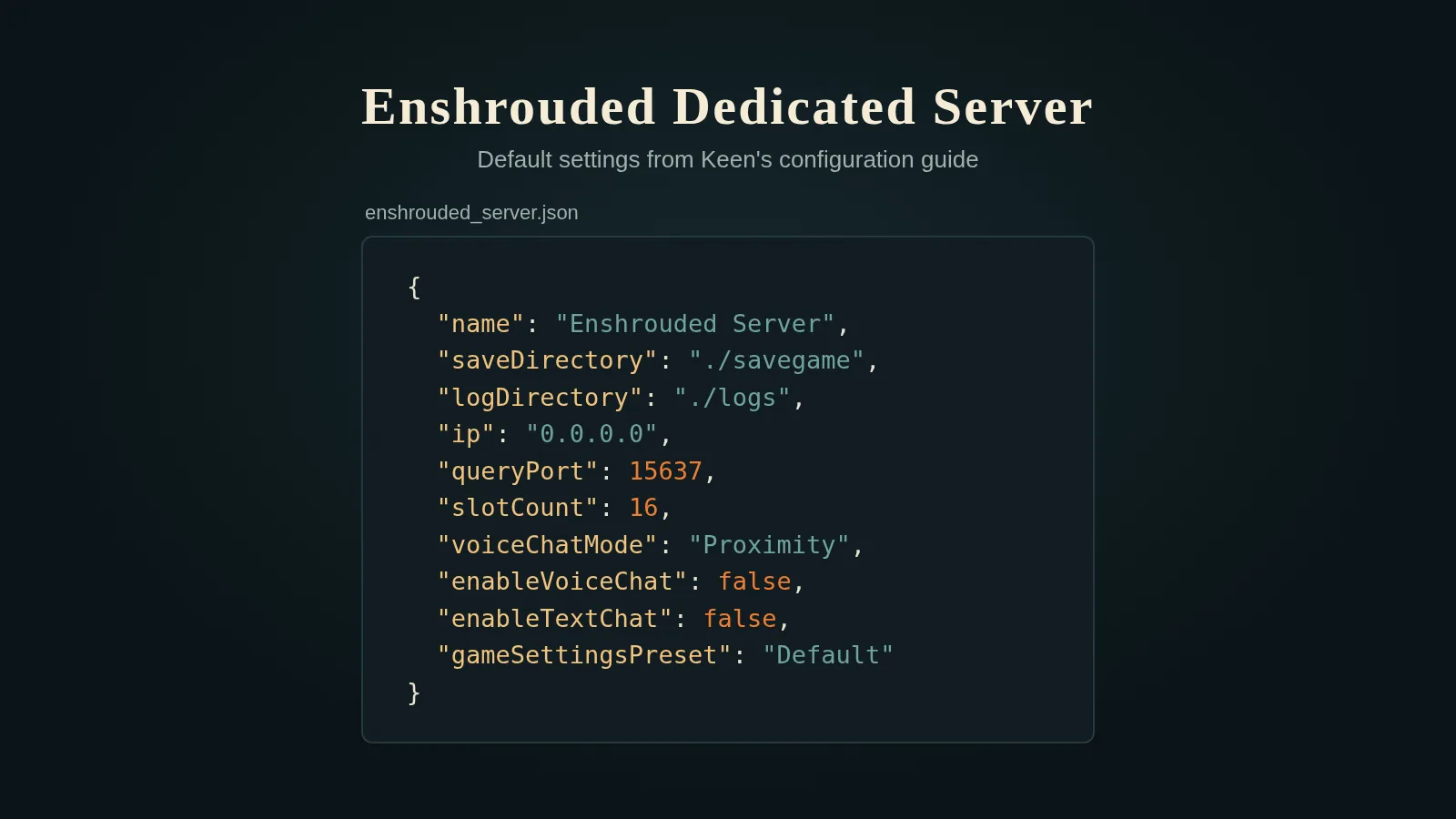
Everything lives in enshrouded_server.json. The main settings, with their defaults from Keen’s configuration article:
{
  "name": "Enshrouded Server",
  "saveDirectory": "./savegame",
  "logDirectory": "./logs",
  "ip": "0.0.0.0",
  "queryPort": 15637,
  "slotCount": 16,
  "voiceChatMode": "Proximity",
  "enableVoiceChat": false,
  "enableTextChat": false,
  "gameSettingsPreset": "Default"
}| Setting | What it does |
|---|---|
name | The server name players see in the server list |
saveDirectory | Where the world save goes. Default ./savegame |
logDirectory | Where logs go. Older logs are archived in logs/backup |
ip | The IP to bind to, for internal network setups |
queryPort | Default 15637. Change it to match your firewall |
slotCount | Player slots, 1 to 16. More players means more CPU and RAM |
voiceChatMode | Proximity or Global |
enableVoiceChat | true or false |
enableTextChat | true or false |
gameSettingsPreset | Default, Relaxed, Hard, Survival or Custom |
The config file and crash dumps sit next to the server .exe.
Difficulty presets
From Keen’s descriptions:
- Default: the standard settings, recommended for first-time players.
- Relaxed: fewer enemies, more resources and loot. Aimed at builders.
- Hard: more enemies, and they’re more aggressive.
- Survival: more aggressive enemies plus extra survival mechanics.
- Custom: unlocks the individual settings under
gameSettings.
With Custom, you can tune values like these (Keen’s Server Gameplay Settings article lists them all):
| Setting | Default | Range |
|---|---|---|
playerHealthFactor | 1 | 0.25 to 4 |
playerManaFactor | 1 | 0.25 to 4 |
playerStaminaFactor | 1 | 0.25 to 4 |
shroudTimeFactor | 1 | 0.5 to 2 |
foodBuffDurationFactor | 1 | 0.5 to 2 |
enableDurability | true | false stops weapons breaking |
enableGliderTurbulences | true | false turns off glider turbulence |
Numbers outside the range are clamped to the nearest limit. Invalid text stops the server from starting, and the console names the bad value. If an old config gets updated wrongly, Keen says you can delete it and the server will make a fresh one.
1.0 added an Automatic option to the setting for how many enemies spawn per encounter. It scales enemy numbers to the players actively playing nearby.
Passwords and user groups
The top-level password setting is no longer used. Passwords now belong to user groups, and the password a player enters decides what they can do. A freshly created config starts with three groups, each with a random password:
| Group | Kick and ban | Chests and containers | Edit bases |
|---|---|---|---|
| Admin | Yes | Yes | Yes |
| Friend | No | Yes | Yes |
| Guest | No | No | No |
Every group can still fight, gather, dig and do quests outside player bases. Each group has these fields:
{
  "name": "Friend",
  "password": "your-password",
  "canKickBan": false,
  "canAccessInventories": true,
  "canEditBase": true,
  "canExtendBase": true,
  "reservedSlots": 3
}- Custom groups: add another entry with its own name, password and permissions. Keen’s example is a group that can use chests and workstations but can’t build.
- Reserved slots:
reservedSlotsholds slots for that group. Other groups see the server as full before those slots fill, so admins and friends can still get in. - Old configs: if your file still has a top-level password from before the user groups update, the server makes a
defaultgroup with that password and Friend permissions. Nothing changes for your players.
Keen’s 1.0 changelog says user groups and passwords on dedicated servers “work as before”. You can’t promote or demote players in game on a dedicated server; that’s only for hosted games.
Joining the server
- In Enshrouded, choose Join, then turn on dedicated servers in the server filter.
- Click the star to favourite a server. Favourites sort to the top.
- If the server doesn’t show up, add it in Steam under View > Game Servers > Favorites with
IP:QueryPort, for example203.0.113.10:15637.
The server uses IPv4.
Saves and backups
- The server stores the world. Character progress is stored only on each player’s PC.
- The world saves every 5 minutes, to the
saveDirectoryfolder. - Keen’s FAQ puts a save at 1 MB to 100 MB, growing with big bases.
Since characters live on each player’s PC, our save editor works on those character saves, not on the server’s world.
Sources
- Keen support: Dedicated Server Installation on Steam
- Keen support: Dedicated Server Configuration
- Keen support: Server Gameplay Settings
- Keen support: Server Roles Configuration
- Keen support: Dedicated Server FAQ
- Keen support: Recommended Server Specifications
- Keen support: Favorite Server via IP
- Keen Games: 1.0 release trailer and changelog
FAQ
How do I get the Enshrouded dedicated server?
It comes free with the game on Steam. Turn on Tools in your Steam library, then download the Enshrouded dedicated server from the Tools list.
What port does an Enshrouded server use?
The query port is 15637 by default. You can change it with queryPort in the server config file. Steam needs its own ports as well.
How many players can join an Enshrouded dedicated server?
Up to 16. Set slotCount in the server config file to any number from 1 to 16.
How do I set a password on an Enshrouded server?
Passwords belong to user groups in the server config file. A new config file starts with Admin, Friend and Guest groups, each with a random password. The password a player enters decides their permissions.
Does the Enshrouded dedicated server run on Linux?
Keen's installation article says only Windows is supported and Linux support is planned. That article dates from February 2024, so check it for updates.
Where are character saves stored on a dedicated server?
They aren't. Keen's server FAQ says character progress is stored only on each player's PC. The server stores the world, saving every 5 minutes.